NextOS Call Center: Agent Activity Detail Report
This is a report that can be run from the Supervisor Dashboard. Click here to return to the Supervisor Dashboard article.
From the main dashboard, select Reporting at the top right.
Report Input
Scope: Select all call centers or just one specific call center.
Type: Run reports over a selected period of time or receive real-time updates. You can also choose to schedule emailed reports at a recurring time.
Output Format: Export the report into an Excel or PDF document if real-time data is not needed.
NOTE: Real-time reports can only be viewed as HTML as they are updated automatically.
Call Completion: This setting is used to count the number of ACD calls an agent has completed within a service level during the specified interval. The Call Completion service level can be set to “1” through “7200” seconds.
Report Output
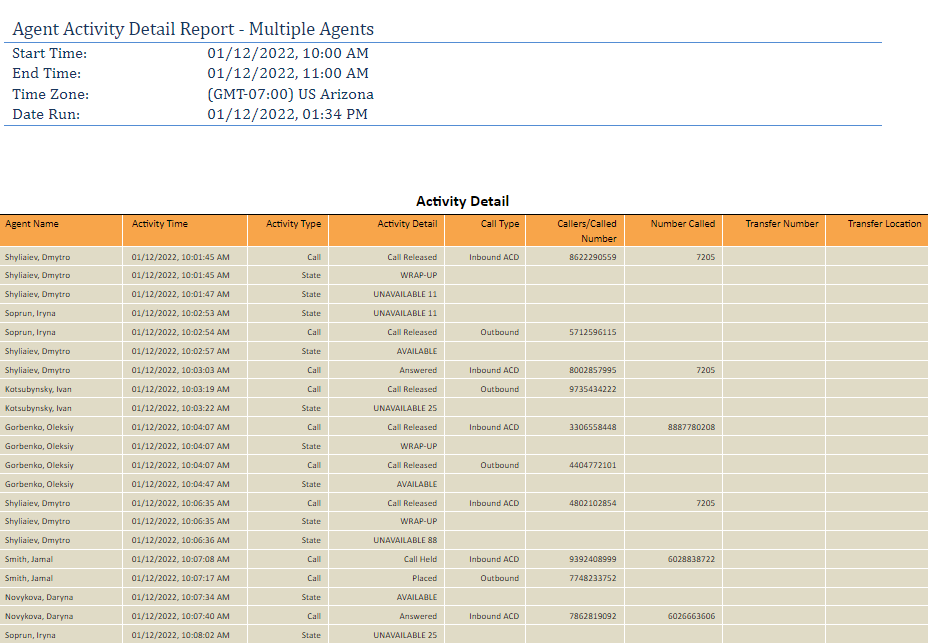
Agent Name - Name of agent.
Activity Time - Time activity occurred (based on the user's time zone setting in their profile).
Activity Type -
- Call - Activity related to a call, either an ACD call, a direct call to the user, or an outbound call.
- State - Changes made to the ACD state of the user. NOTE: There is not a way to show who or why the ACD state was changed.
Activity Detail -
- Answered - Answered an inbound call.
- Call Held - Put caller on hold.
- Call Retrieved - Retrieved call from hold.
- Placed - Placed outbound call.
- Call Released - Hung up on active call, or declined a ringing call.
- AVAILABLE - ACD state set to available.
- WRAP-UP - ACD state set to wrap up.
- UNAVAILABLE XX - Agent went into unavailable code (XX will reflect the unavailable code number).
- SIGN-IN - ACD state set to sign-in.
- SIGN-OUT - ACD state set to sign-out.
Call Type -
- Inbound ACD - Inbound call from queue.
- Outbound - Outbound call placed by agent.
- Inbound - A direct call to the agent, not from a call center.
- Internal - Internal call to another user on the account.
Callers/Called Number - Phone number of the caller for inbound calls, or phone number called for outbound calls.
Number Called - Phone number called by an inbound caller.
Transfer Number - Phone number or extension a call was transferred to by the agent.
Transfer Location - Where a call was transferred:
- Outside Enterprise - Call was transferred to an outside number.
- Call Center - Call was transferred to another call center.
- Within Enterprise - Call was transferred to a non-call center location inside the enterprise.